

Sales analytics might sound like a buzzword but in reality it is the backbone of modern sales strategy, transforming data into actionable insights that drive performance and growth. By understanding and implementing effective sales analytics, sales managers and teams can streamline their operations, optimise performance, and achieve their goals more efficiently. If you’re looking to boost your sales performance and streamline your management tasks, you’re in the right place. In this guide, we’ll walk you through five essential steps to mastering sales analytics, which will provide you with a clear roadmap to turn your data into actionable insights that can supercharge your sales strategy.
Understanding Sales Analytics
Before we get into the steps, it’s important to understand what sales analytics is all about. At its core, sales analytics is the process of leveraging data to gain insights into sales performance, customer behaviour, and market trends. It involves collecting, analysing, and interpreting data from various sources to inform decision-making and drive sales growth.
The Role of Sales Analytics in Streamlining Sales Management
Sales analytics plays a pivotal role in streamlining sales management tasks and optimising team performance. It provides sales managers with complete oversight of sales team activities, from tracking calls, emails, and visits to setting targets and measuring individual performance. With sales analytics, managers can gain valuable insights into company, territory, and product group performance, allowing them to spot gaps, patterns, trends, and changes in sales performance with ease. Additionally, sales analytics enables managers to track key performance indicators (KPIs) across all aspects of sales operations, providing them with the data they need to make informed decisions and drive sales growth.

5 Essential Steps to Mastering Sales Analytics
Implementing sales analytics effectively involves several key steps. Here are five steps to consider when performing sales analytics:
1. Know What You Want to Analyse
The first step in performing effective sales analytics is to clearly define what you want to analyse. This involves identifying the specific aspects of your sales operations that require attention. Do you need insights into sales team performance, customer behaviour, or market trends? Are you looking to improve sales in a particular territory or among a specific product group?
Having a clear focus will help you gather the most relevant data and derive actionable insights. For instance, if your goal is to enhance customer relations, you might want to analyse customer feedback, buying patterns, and interaction history. If you’re aiming to boost sales team productivity, focus on tracking activities such as calls, emails, and meetings.
2. Set Good Objectives
Once you know what you want to analyse, the next step is to set clear and achievable objectives. Define what you hope to achieve with your analysis. Objectives could range from increasing sales in a particular region to identifying high-value customers or improving the efficiency of your sales processes.
Good objectives are specific, measurable, achievable, relevant, and time-bound (SMART). For example, instead of setting a vague goal like “improve sales,” you might set a more specific objective like “increase sales in the M40 corridor by 20% within the next quarter.” Having well-defined goals will guide your analytical process and ensure you stay on track.
3. Choosing How You Want to Compile Your Data
Data compilation is a crucial step in sales analytics. There are two primary methods: manual data compilation and using Customer Relationship Management (CRM) and Sales Analytics software.
Manual Compilation: This method typically involves using tools like Excel or Google Sheets to keep track of your data. While it is possible to perform sales analytics manually, it is less practical in today’s fast-paced business environment. Manual data entry is time-consuming, prone to errors, and can quickly become overwhelming as your data sets grow.
CRM and Sales Analytics Software: A more efficient and adaptable approach is to use CRM and sales analytics software. Tools like Toucan Sales Analytics streamline the data collection process, reduce the risk of errors, and provide powerful analytical capabilities. These tools can automatically gather data from various sources, integrate it seamlessly, and offer advanced features like real-time dashboards and automated reporting.
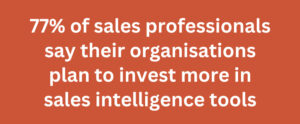 Notably, 77% of sales professionals say their organisations plan to invest more in sales intelligence tools, underscoring the growing recognition of the value these technologies bring. Using CRM and sales analytics software not only enhances data accuracy but also provides deeper insights and actionable intelligence that can significantly improve your sales strategies.
4. Visualisation is Key to Success
Once you have your data compiled, the next step is to visualise it. Data visualisation helps in understanding complex data sets by presenting them in a more digestible format. Visualisation tools like charts, graphs, and dashboards can make it easier to identify trends, patterns, and correlations in your sales data.
Effective visualisation not only aids in data interpretation but also helps in communicating findings to your team and stakeholders. Tools like Tableau, Power BI, and Looker are particularly useful for creating powerful visualisations that can highlight key insights at a glance.
For example, a well-designed dashboard can show you how different sales territories are performing, track monthly targets against actual performance, and highlight areas that need attention. By visualising your data, you can quickly grasp the big picture and make informed decisions to drive sales growth.
5. See What Needs to Be Prioritised and What Trends to Follow
 The final step in performing sales analytics is to interpret the results and determine what actions to take. This involves identifying which areas require immediate attention and which trends are worth following.
Prioritise actions based on their potential impact on your sales objectives. For instance, if your analysis reveals that a particular product group is underperforming, you might prioritise efforts to boost sales in that area through targeted marketing campaigns or sales incentives.
Similarly, if you notice a trend of increasing sales in a specific territory, you might want to allocate more resources to that region to capitalise on the growth potential. Continuously monitoring these insights will help you adapt your strategies dynamically and stay ahead of the competition.
Tools and Functionalities
Now that we have a better understanding of what sales analytics is and why it matters, let’s take a closer look at some of the tools and functionalities that make it all possible. Sales analytics offers a wide range of tools and features designed to streamline sales management tasks and optimise team performance. Some examples include:
- Complete Oversight of Sales Team Activities: Track calls, emails, and visits to ensure your team is staying on track and hitting their targets.
- Setting Targets and Measuring Individual Performance: Set targets for each member of your team and measure their performance against those targets to ensure accountability and drive results.
- Insight into Company, Territory, and Product Group Performance: Gain a comprehensive understanding of your company’s overall performance, as well as performance at the territory and product group levels.
- Spotting Gaps, Patterns, Trends, and Changes in Sales Performance: Identify areas for improvement and optimisation by spotting gaps, patterns, trends, and changes in your sales performance data. Create opportunities to sell deeper and wider across your product ranges.
- KPIs Across All Aspects of Sales Operations: Track key performance indicators (KPIs) across all aspects of your sales operations to ensure you’re meeting your goals and objectives.
One notable tool in this space is Toucan Sales Analytics. Developed in collaboration with B2B wholesale and distribution companies, Toucan addresses age-old challenges in sales management by providing deep insights into client needs and buying patterns. It not only reports on historic performance but also highlights areas with opportunities and provides calls to action to fuel customer service efforts. By streamlining tasks like performance tracking, time management, and priority setting, solutions like Toucan empower teams to sell smarter and more effectively.
Conclusion
Sales analytics is a powerful tool that can help sales managers and teams unlock the full potential of their sales efforts. By following these five steps—knowing what to analyse, setting good objectives, choosing the right data compilation methods, visualising data effectively, and prioritising actions based on insights—you can leverage sales analytics to drive growth, increase efficiency, and achieve greater success in today’s competitive business landscape.
Toucan Sales Analytics make this process even more efficient by offering deep insights and streamlining routine tasks. So, whether you’re a seasoned sales veteran or just starting out on your sales journey, now is the time to embrace the power of sales analytics and take your sales efforts to the next level.
To see how Toucan can transform your sales strategy, get in touch with us for a personalised short demo. Embrace the power of sales analytics and take your sales efforts to the next level.
Until next time, happy selling!